LinkedIn is the world’s largest professional network on the internet. It is primarily used to secure jobs and internships, network with professionals in your field, connect with colleagues and friends, and learn valuable skills for your career. More and more folks are adding LinkedIn to their resume and using it as an “in” to get the job of their dreams. This post covers each major section you will complete to build your profile, with a few tips and tricks along the way!
Your Profile
A complete LinkedIn profile is vital to making a good impression, connecting you with opportunities, and expanding your network. LinkedIn is used by anyone who is looking to advance their career and I encourage all students I work with to create their profile freshman year of college. This way, they can use LinkedIn to begin building a network of professionals that can help them find work upon graduation! If you are already a working professional, LinkedIn can help you track your network and seek advancement opportunities. Further, you can create a LinkedIn account for your business to connect with clients, employees, and future customers in meaningful ways. Below, we will cover how to create and populate an individual user profile. Don’t forget, this is also a service I offer, so if you’re finding you don’t have enough time to create a profile from scratch, reach out on my contact me page!
Creating an Account
The first step to building your LinkedIn Profile is to create an account. This process is best completed on a desktop or laptop computer, but can also be completed by downloading the LinkedIn app to your phone or tablet. Visit https://www.linkedin.com/home and select “Join Now” to create your account.
All you need to create your account is an active email account. I recommend using a personal email that is professional in nature, such as firstname.lastname@gmail.com. When using a school or work email, you risk losing access to your account once you are no longer affiliated with the organization that provided your email. Further, depending on your privacy settings, your email may be visible to your direct connections and jobs you’ve applied with. As such, a personal email such as SuperGamer69@gmail.com is not recommended.
Once your account has been created, it’s time to populate your profile. I recommend completing the steps below completely before you begin connecting with folks!
About

Your primary profile or “about” section is the first thing people will see when they search your profile or enter your LinkedIn URL. This section includes your name, photo, current job, education history, your region, and the number of connections you have. All of these items can be adjusted in your privacy settings. For example, you can choose to hide your current job entirely or to make your photo visible only to people who have a mutual connection with you.
Pro Tip: Customize your LinkedIn URL so that it looks more professional and will fit more easily on your resume.
This section also includes a space to write a brief biography. In general, this space should summarize your experience and goals in eight sentences or fewer. Think of this section as the key items you want a recruiter to know to convince them to read your resume. Highlight your most recent experience, your highest awards, and the things that make you a unique applicant.
Pro Tip: Profiles with professional headshots are more likely to be accepted as connections and contact by recruiters.
Experience
The next major section of your LinkedIn Profile is the “experience” section. This portion is essentially your resume. You will list your work experiences including the organization where you worked, job title, dates of employment, location, and key job duties. There are separate sections on your LinkedIn profile for non-work related positions such as coursework, volunteer work, trainings, and more. If the organization you worked with has a company LinkedIn profile, your experience will also populate with the company logo and will link directly to the company. If you currently work with a smaller business that does not have a company LinkedIn profile, I recommend encouraging them to create a profile as this connection enhances the professional look of your profile, legitimizes your job position, and provides an easy path for recruiters to learn more about your work.
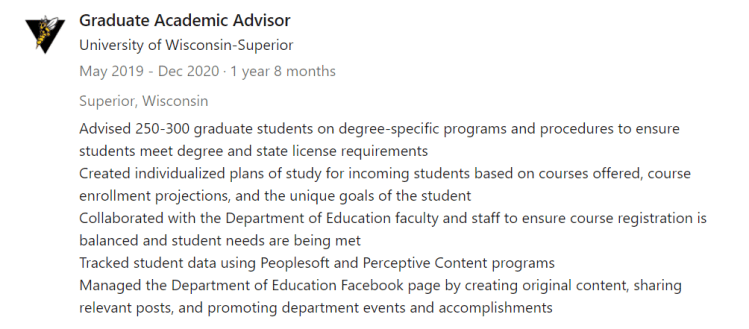
Much like the tips we discussed in the Resume Tips & Tricks article, you will create bullet points for each experience which use the format [Action Verb + Task & Details + Result].
- Advised 300 graduate students on degree-specific programs and procedures to ensure students meet degree and state license requirements.
- Created interesting and relevant content for social media pages which increased post reach and customer engagement online.
- Coached students with high communication apprehension in a one-on-one setting to increase their confidence in public speaking.
- Identified procedural areas of improvement through customer data using SQL to help improve the profitability of the company by 8%.
You may also have some bullet points that will not include a result. For example, in the medical field when listing tasks that all support patient health and well-being, you would not need to point out that your tasks are supporting patient health and well-being in every bullet point as that would be redundant. Further, if you are currently employed in the position, you will use present tense verbs as opposed to the past tense verbs provided in the previous example.
- Deliver care for elderly patients suffering from dementia
- Asses patient health by conducting interviews, physical exams, and reviewing medical history
Education
The next major section is education. This is where you list any university or other relevant education. Typically, you would NOT include high school education and earlier. However, if high school is your highest level of education, you may want to include it. The education section should include the name of your university or college (linked to their profile so the logo appears), your specific degree, and the dates you attended the school.
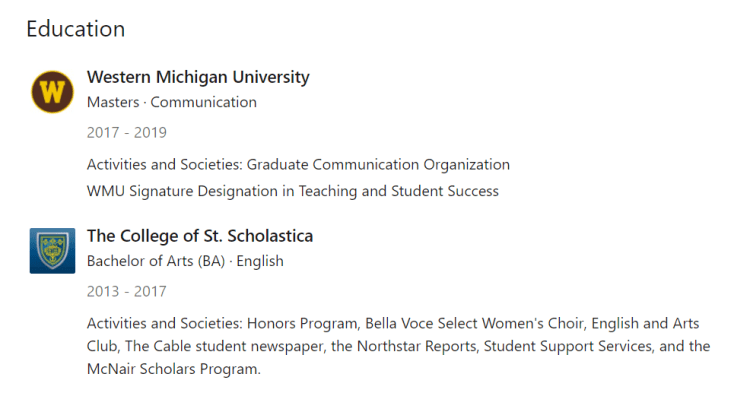
Next, you will be able to fill out an activities and societies box. This is where you can put any relevant or interesting clubs, organizations, and programs you participated in at these schools that are not substantial enough to be an experience in the previous section. In the image above, you can see that I have included one professional organization under my graduate school and information on the additional line on my degree. In the undergraduate section, you can see all of the clubs I participated in as well as several professional organizations. If desired, you can also include any roles you held with these organizations. For example, I could add “President of English and Arts club” or “Business Manager for The Cable student newspaper.” I chose not to include these titles as they are not relevant to the work I am currently doing.
Volunteer Experience
Up next is the volunteer portion of your LinkedIn profile. This portion shows your experiences that are typically shorter, unpaid, or otherwise not considered work experience. Volunteering in your community can show potential employers that you are willing to go above and beyond the call of duty, that you are invested in the community where you live, and show them what kind of person you are. I recommend you ensure that you have at least a few volunteer experiences that support the community or are related to your area of work to help fill out your LinkedIn profile, especially if you are a young professional looking to apply for colleges, scholarships, and entry-level job positions.
Pro Tip: You can find volunteer opportunities in your city through volunteermatch.org, your local United Way organization, and often on your cities government website.
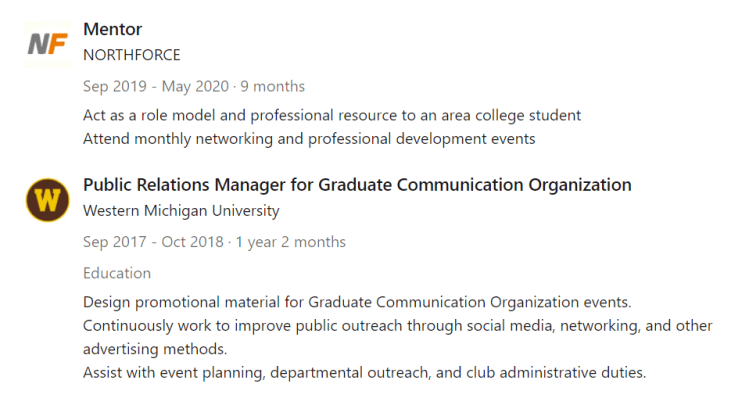
You can include both community service and university service in this section. Here is an example of one of each from my profile:
Skills and Endorsements
The skills and endorsements section is where you showcase your strengths and where co-workers, clients, and friends can endorse what you do. Having specific and relevant key words in this section will help recruiters find you. Focus on adding industry relevant skills. For example, if you are a skilled coder, add each of the coding languages you are proficient in. These are hard skills you are likely to use in your job daily and are needed to advance in your industry. You may also add soft skills, such as leadership, public speaking, or communication.
Once you have identified which skills you would like featured on your profile, you can reach out to folks and ask that they endorse you. The easiest way to do this is to go to the profiles of folks you’ve worked with and endorse their skills. The average LinkedIn user will simply return the favor. If someone you want to endorse you is not on LinkedIn often or is a very busy person, you may choose a more direct ask in person, via email, or via LinkedIn message. Here is an example of an outreach message:
Good morning Mikhael,
I hope this message finds you well! I am updating my LinkedIn Profile in preparation for my upcoming job search for positions in event planning. As we worked closely together on the planning and execution of the 5k Fun Run for Cancer Research, I am hoping you will be willing to endorse me for event planning and any other skills you find relevant on my LinkedIn profile. Here is the link.
Thank you for your time,
Elizabeth
LinkedIn will automatically organize your skills by categories such as industry knowledge, tools & technologies, interpersonal skills, and other. Skills that are the most endorsed will automatically appear at the top of your list, so make sure to prioritize your endorsement asks with the skills that are most important to you!
Accomplishments
LinkedIn has 8 different types of accomplishments that they encourage you to add to your profile: Courses, Honors and Awards, Language, Patents, Projects, Publications, Test Scores, and Organizations. You are most likely to use the first three of these lists so we will go over these in more details. Here is an example of my honors and awards section:

As you can see, in my first example I have listed only the name, location, and date of a certificate I earned through Professional Development. In the second example, I included these same details AND added a description so that folks reading the page can understand the importance of the award.
Interests
The final section on your LinkedIn profile is your interests. This is not the same as your likes and interests on Facebook where you add your favorite bands, movies, and coffee shops. Instead, the interests portion shows which organizations you follow. These organizations are divided into three categories, depending on how their profile appears on LinkedIn: Companies, Groups, and Schools. To follow an organization, you can use the search bar on the LinkedIn homepage and search specific organization names or key word searches.
So who should you follow? To start, follow organizations where you have studied, have worked, have volunteered, and companies where you would like to do these things. Next, follow organization that are considered experts in your field, that produce research and articles in your area of work, and that are stakeholders in the work that you do. For example, my work is in career readiness for college students. I follow, 1) All of the colleges I attended and have worked for 2) All colleges in my area that I am likely to work with or connect with at conferences 3) Inside Higher Ed Magazine 4) The National Association of Colleges and Employers 5) Other places I have worked and volunteered.
By following these organizations, I see their articles and announcements on my news feed which helps me stay up to date on happenings in my industry or that may impact me as an alumni. Further, recruiters and my connections can see that these interests which can start great conversations.
Bonus: Making Connections!
Making connections is integral to a successful LinkedIn account. To add connections, select “My Network” from the homepage. LinkedIn will provide a list of people you may know based on your interests, location, and mutual connections. If you see someone you’d like to connect with, click “Connect” and add a custom message. You can also search for someone in the search bar and click “Connect” on their profile.
Pro Tip: People are more likely to accept your connection request when you include a personal message.
To start, connect with people you know incredibly well. These are friends, family, classmates, and current co-workers. You may also consider current supervisors and faculty members, but in general it is best to ask them if that is appropriate before sending the request. Next, request former connections such as past co-workers, supervisors, classmates, etc. It is best to have your profile and connections well established before reaching out to people you don’t know well or have not yet met. Keep in mind, you should NOT add random strangers. Your connection outreach should be intentional – add people you hope to work with, who can give you additional knowledge, or with whom you have things in common. For example, when I knew I would be moving to Colorado, I used LinkedIn to find alumni from my graduate college that were already working in similar roles in Colorado. Here is a message I sent:
Hi Jane!
My name is Tayler Boelk and I am an alumni of Western Michigan University. Go Broncos! I am planning to relocate to Colorado this Fall and see that you are working at X University in Denver. I am looking for positions in academic advising and career readiness. Would you be willing to chat with me about your experience moving to Colorado and share any tips you may have about the universities in the Northern Colorado Area?
Thank you for your time,
Tayler Boelk
Similarly, you should not accept requests from random strangers that have not given you a clue as to why they are reaching out. As with any platform, there is the potential for spammers and scammers to try and connect with you. You will also be making decisions on folks you do know that you may not want to connect with. For example, many teachers have a strict rule that they will not connect with students until after they have graduated. Or, you may have a former coworker who was known to be unreliable, difficult, or is otherwise someone you would not want to be associated with.
Thank you for stopping by my blog to learn more about LinkedIn and good luck on your job hunt! If creating a profile from scratch sounds like a lot of work, you can hire me to create the profile for you! I am also happy to review and provide feedback on your completed profile for a discounted rate. Feel free to reach out!
 Tayler Mercil